Volume & Cut-Fill Calculation from DEMs
Calculate stockpile volumes and cut-fill between two epochs in CartaX: volume measurement and the A/B analysis workspace.
2026-08-17 · 5 min read
Two questions dominate every construction site: "How much material is in that pile?" and "How much earth moved since last month?" They are different calculations and they live in different screens in CartaX. Knowing which is which decides whether you can trust the number you get.
Single epoch: volume measurement (stockpiles)
With a single flight you hold exactly one surface. Volume, however, is the difference between two surfaces — a top and a base. If the base was never measured, it has to be assumed, and that assumption is the accuracy ceiling of the result.
The Volume tool in the point cloud viewer is therefore not a surface calculation but a box volume tool: you place a box in the cloud ("Place the volume box; press ESC to cancel."), drag and size it, and the screen reports the volume of the box. It does not follow the real top surface of a stockpile; treat it as an upper bound or an order-of-magnitude estimate, not a number you invoice against.
There is no volume tool in the map toolbar. Older versions produced an approximate volume on the map from "horizontal area × a fixed 5 m depth"; that fabricated result was removed in September 2026. What you can measure on the map today is distance, area, line of sight and points — see measurement tools.
For real cubic metres you need one of two things:
- Compare two epochs (next section) — then the base is measured
- Or use the pre-stockpile flight's orthophoto + DTM pair (or CartaX Studio photogrammetry output) as the reference epoch — an epoch consisting of a DEM alone cannot be created; an elevation model is always uploaded attached to an orthophoto

Two epochs: cut-fill in the Analysis workspace
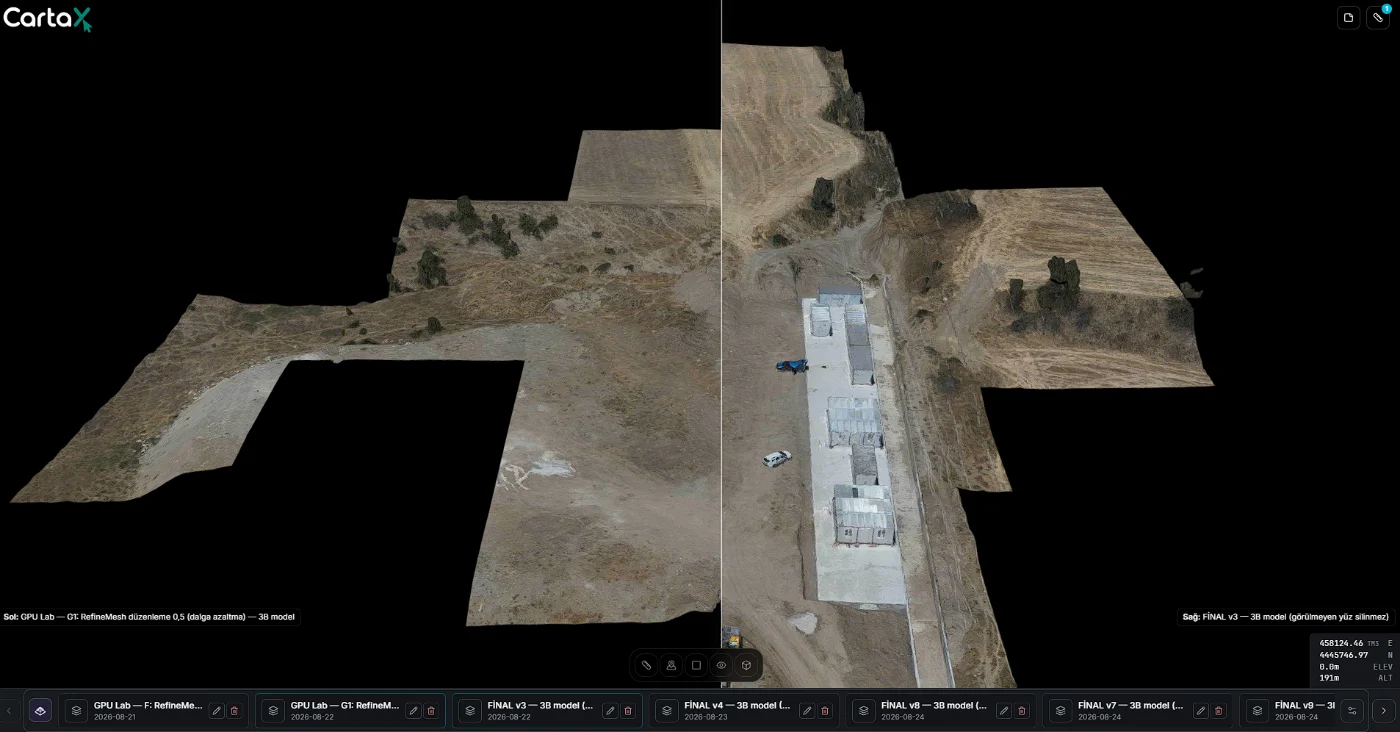
The real calculation happens in the 3D model comparison of the Analysis workspace (the Analysis workspace is part of the Professional plan; it does not open on the Free plan). You open two epochs of the same site side by side — older on the left, newer on the right — press the cube icon at the far right of the toolbar (Cut-Fill), draw a closed polygon and start the calculation with a right click. CartaX splits the interior into a grid, samples the surface elevation of both epochs in every cell, and converts the difference into volume.
The tool exists only in the 3D model comparison: there is no cut-fill in the orthophoto comparison, and the point cloud comparison has a different tool set.
The sign convention is fixed: dz = new − old. A positive difference is fill, a negative difference is cut.
The result line gives you four values:
| Field | Meaning |
|---|---|
| Cut (m³) | Sum over cells where the ground dropped |
| Fill (m³) | Sum over cells where the ground rose |
| Net (m³) | Fill − Cut (the balance) |
| Samples | Number of grid cells that entered the calculation |
On screen it reads like this: "Cut: 1,240.5 m³ · Fill: 318.2 m³ · Net: −922.3 m³ · Samples: 8412". Values over one million m³ are abbreviated as M m³.
Elevations come from one of two sources, and the tool chooses for you:
- If both epochs have a DSM/DTM, they are sampled straight from the elevation model (DSM wins when both exist). This is the most accurate path. Cell size follows the data's resolution, down to 0.5 m; the grid is capped at 12,000 cells.
- If there is no elevation data, the calculation samples the two models' own surfaces. The tool does not stay disabled and never silently returns zero.
Any visual height offset you applied to a model is excluded from the calculation.
How DSM/DTM choice affects results
This is the single decision that distorts results the most. A DSM carries everything on the surface; a DTM carries bare ground.
- Measuring earth movement? Use DTM. With a DSM, grass that grew between flights, a parked truck or a newly installed site container all get booked as fill.
- Measuring the pile itself? The top surface should come from the DSM and the base from the pre-stockpile DTM.
- Never mix model types across epochs (one DSM, one DTM). The difference you compute would be a model-type difference, not earth movement.
Interpreting the numbers
Read the coverage ratio. If part of the polygon falls outside the overlap of the two models, or lands on NoData cells, the result represents only a portion of the polygon. CartaX reports this as a ratio; below 1, the number is incomplete. If the polygon sits entirely outside the overlap, no calculation is performed at all.
Remember the cell size. Because the grid is capped, very large polygons produce large cells and fine detail averages away. Measure a big site with several polygons rather than one — it is both more accurate and it tells you where the volume came from.
Put the reference surfaces in the report. "1,240 m³ of cut" on its own is incomplete; without the two dates, the model type and the polygon, the figure cannot be verified by anyone else.
Summary
| Question | Answer |
|---|---|
| Can one flight give real volume? | No — the base is not measured; the point cloud Volume tool is a box volume |
| Is there a volume tool on the map? | No; the map toolbar has line, area, line of sight and point |
| Where are real cubic metres? | Analysis workspace (Professional plan), 3D model comparison, two epochs |
| Sign convention? | dz = new − old; + is fill, − is cut |
| No DEM available? | Computed from the mesh surface if both epochs have one |
| Which model type? | Earth movement → DTM; object volume → DSM |
| What if data is missing? | Coverage ratio drops and a warning is printed |